I'm a sucker for colourful Grafana graphs (and not-necessarily-useful data logging in general), so naturally, I also had to see if I could get some hardware stats from my Steam Deck in there. Turns out: thanks to Deck's Linux foundation, this is quite easy. All you need to do is enable SSH access (or work directly on the device) and set up a systemd user timer with whatever kind of data logging you want. In my case, I did the following:
- Switch to desktop mode
- Open
konsole(i.e., the terminal app) - Run
passwdto set a password for thedeckuser ssh deck@steamdeckfrom my workstation- Install a script for InfluxDB logging in
~/bin - Install a user service and associated timer in
~/.config/systemd/userto run this script every few minutes - Enable the timer
My script looks as follows:
#!/bin/sh

HOST=steamdeck

exec curl -s -XPOST 'https://[…]/influxdb/write?db=hosts' \
--data "
memory,type=embedded,host=${HOST} $(free -b | awk '($1 == "Mem:") { printf "used_bytes=%d,used_percent=%f", $2 - $7, ($2 - $7) * 100 / $2 }')
$(awk '($1 ~ /^(.*):$/) { gsub(/:/, "", $1); printf "interface,type=embedded,host='${HOST}',name=%s rx_bytes=%d,rx_drop_count=%d,tx_bytes=%d,tx_drop_count=%d\n", $1, $2, $5, $10, $13 }' /proc/net/dev)
$(df -B1 | awk '($1 != "Filesystem") { gsub(/%/, "", $5); printf "filesystem,type=embedded,host='${HOST}',device=\"%s\",mountpoint=\"%s\" total_bytes=%d,used_bytes=%d,available_bytes=%d,used_percent=%d\n", $1, $6, $2, $3, $4, $5 }')
load,type=embedded,host=${HOST} $(awk '{print "avg1=" $1 ",avg5=" $2 ",avg15=" $3}' /proc/loadavg)
users,type=embedded,host=${HOST} $(who | awk '($5 !~ /tmux/) {logins++} END { printf "login_count=%d,session_count=%d", logins, NR }')
battery,type=embedded,host=${HOST},id=1 capacity_percent=$(cat /sys/class/power_supply/BAT1/capacity),cycle_count=$(cat /sys/class/power_supply/BAT1/cycle_count),voltage_uv=$(cat /sys/class/power_supply/BAT1/voltage_now)
$(for i in /sys/class/thermal/thermal_zone*; do test -r $i/type && test -r $i/temp && echo "sensor,type=embedded,host=${HOST},name=$(cat $i/type) mdegc=$(cat $i/temp)"; done)
"
This gives me stats about memory and disk (SSD + µSD) usage, load, and current battery charge and voltage. Unfortunately, power readings do not seem to be available.
For instance, the following screenshots show an evening DOOM session, followed by leaving the Deck idle to finish some downloads.

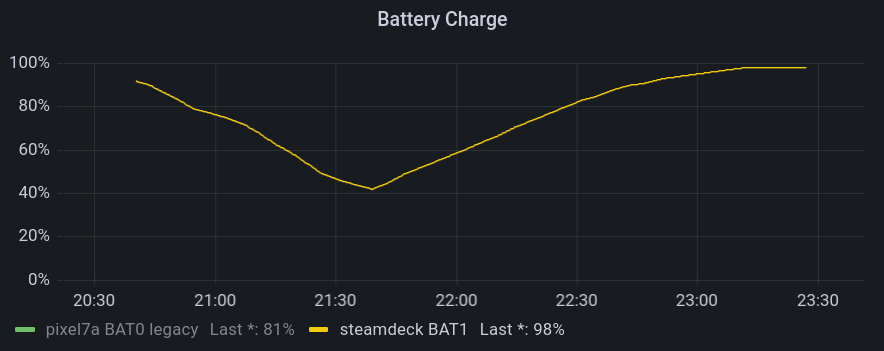

They allow for insights such as:
- The Steam Deck typically reaches 80°C when running hardware-intensive games
- Battery drain really depends a lot on what kind of game you're playing
- The Lenovo USB-C Slim Travel Dock I'm using for working at home works just fine with the Steam Deck, but fails to negotiate proper power delivery, so the battery slowly drains when playing.